Showing posts with label Oracle 11g. Show all posts

Sunday, November 27, 2011

Who is using your Undo space? - Improved Script

Add to Technorati FavoritesVer este articulo en Español

Hi folks!
I have extended the Undo usage scripts to include two additional indicators:
1) undo change vector size statistics
2) Used undo records/blocks

and support for RAC infrastructure, so you can spot the hungriest UNDO eaters for any given instance.

Then the script for Oracle 11g is as follows:
set pagesize 400
set linesize 140
col name for a25
col program for a50
col username for a12
col osuser for a12
SELECT a.inst_id, a.sid, c.username, c.osuser, c.program, b.name,
a.value, d.used_urec, d.used_ublk
FROM gv$sesstat a, v$statname b, gv$session c, gv$transaction d
WHERE a.statistic# = b.statistic#
AND a.inst_id = c.inst_id
AND a.sid = c.sid
AND c.inst_id = d.inst_id
AND c.saddr = d.ses_addr
AND a.statistic# = 284
AND a.value > 0
ORDER BY a.value DESC

If you want to run this script on versions 10g1 and 10g2, just replace the statistic# with 176; 216 if your database is 11gR1... or use the following version independent script!!! (Hope we don't change the statistic name).

set pagesize 400
set linesize 140
col name for a25
col program for a50
col username for a12
col osuser for a12
SELECT a.inst_id, a.sid, c.username, c.osuser, c.program, b.name,
a.value, d.used_urec, d.used_ublk
FROM gv$sesstat a, v$statname b, gv$session c, gv$transaction d
WHERE a.statistic# = b.statistic#
AND a.inst_id = c.inst_id
AND a.sid = c.sid
AND c.inst_id = d.inst_id
AND c.saddr = d.ses_addr
AND b.name = 'undo change vector size'
AND a.value > 0
ORDER BY a.value DESC
 
Read the popular 2008 article Who is using your UNDO space?

Interested on MySQL Performance? Read  Book Review - High Performance MySQL


Subscribe to Oracle Database Disected by Email

Follow IgnacioRuizMX on TwitterDelicious
Bookmark this on Delicious

Friday, July 15, 2011

The Oracle Exadata: latest Business Weapon

Add to Technorati Favorites
Ver este articulo en Español

Sorry I’ve been having a lot of work installing, maintaining and migrating to Database Machines all over Latinamerica for the latest 10 months; that means lot of travels abroad, all of them very exciting, but the real excitement comes from my job working with this wonderful Machine.

Was on the last project when realized how important is this investment for our customers, having this big caribbean Telco installed their first Exadata and later migrated their databases meant for them dramatic performance improvements and the ability to get more up-to-date analytical information and compete better and more agile.

Of course the Database Machine fulfilled expectations when we achieved a processing reduction of 6x on their nightly batch processes, going from 8-9hrs processing time, down-to 1.5-2hrs processing time. What this means: now they’re able to increase the refreshing time of their analysis tools 12 times a day and on demand, instead of having latest information one day behind.

Read my related article on Exadata Hybrid Columnar Compression

My steps to implement EHCC

Recommended reading on My Oracle Support notes that helped make this happen:

Migrating to Oracle Exadata Storage Server Paper (PDF)

Oracle Sun Database Machine Performance Best Practices [ID 1067520.1]


Subscribe to Oracle Database Dissected by Email
Follow IgnacioRuizMX on Twitter

Delicious Bookmark this on Delicious

Tuesday, November 30, 2010

My Steps to Implement Exadata EHCC

Add to Technorati Favorites


Ver este articulo en EspañolSubscribe to Oracle Database Disected by Email

Last time I was engaged with an Exadata migration, customer asked me about EHCC and how to implement it for their datamarts.

My approach (at that time) consisted on the following:
1) Get a sample of very big objects to play with
2) Used DBMS_COMPRESSION in order to get estimations for compression rates
3) Try every compression type: Basic, Query Low, Query High, Archive Low, Archive High and recorded size reductions, time to import and time for FTS.
4) Recorded and compared timings for various batch processes and important queries

With all those statistics, went to the customer and then he was able to take a decision based on nature of data, popular timeframe of querying within the data window, parallel degree, partitioning defined (BTW customer already had it on place, best practice!), and so on.

I've used Datapump to import because it uses direct path load and Basic compression needs it to kick in.

Further thinking on this matter resulted on proposals to include table usage (V$SEGMENT_STATISTICS) & table data dynamics (Monitoring+DBA_TAB_MODIFICATIONS) in order to fine tune the compression mode selected. The next time I've the opportunity to include this on the process, I'll share with you the results...

Thank you very much for your time, and if you liked this post please share with others freely...

Follow IgnacioRuizMX on Twitter

Delicious Bookmark this on Delicious

Tuesday, November 23, 2010

From 3Tb to 1.5Tb Using standard COMPRESS and PCTFREE

Add to Technorati Favorites

Ver este articulo en Español

I've been working on a migration project, with very aggressive dates and a couple of requirements that increase difficulty: switch from filesystem to ASM, using 50% of new storage... yes, you got the right picture, we don't have full set of disks for ASM to fit all data, therefore I need to move data trying to release complete datafiles in order to free those logical volumes or LUNs, and later add them to ASM.

Anyway, I realized that given this is a DSS or Datawarehouse, there is some margin to increase "data density" per block, in other words decrease the amount of space within one data block that is wasted reducing PCTFREE.

Another opportunity to decrease storage usage came from the fact customer is upgrading from 10.2.0.4 to 11.1.0.7, so I can use STANDARD improved compression features on DATA!!!

The final touch came from a long time (and some times under-used feature), Index Key Compression. If you want more detail, can see my posts back from 2008 about this feature Index Key Compression - part I, Index Key Compression - part II and Index Key Compression - part III. Well, thanks the customer provided an environment dedicated to this project I was able to start doing som very expensive analysis on Index compression, with this strategy on mind: choose the biggest indexes to compress, then doing the ANALYZE INDEX ... VALIDATE STRUCTURE OFFLINE and SELECT * FROM INDEX_STATS for each candidate. (Please note you can consider not only massive indexes, but those heavily used too... for that you need to get usage info from V$SEGMENT_STATISTICS). Some indexes compressed very well, with 40%-50% space savings, while others didn't got that good rates on 4% or 6%, just depends on information nature/distribution.

First got all my tables with current allocated space, from DBA_SEGMENTS, filled one spreadsheet with this info and considered extra columns for PARALLEL degree for movement and compression flag, and so on. Using a formula was able to get 3000+ statements like this one:

ALTER TABLE ... MOVE PCTFREE 2 TABLESPACE DAT_ASM_HP NOLOGGING COMPRESS PARALLEL 8;

or like this one for indexes:

ALTER INDEX ... REBUILD TABLESPACE IDX_AHP COMPRESS 1 PARALLEL 8 NOLOGGING PCTFREE 2;


Well, final figures were:

Tables Starting:1.9Tb Ending:1Tb
Indexes Starting:1.0Tb Ending:0.5Tb

I have to remark that this space reductions:
1) Depend on this particular data distribution or patterns
2) After index rebuild, with time flowing and info gets inserted, Indexes will tend to "stabilize" and make block splits thus free space. (see this post on Index Dynamics)
3) Inserts and updates on tables will tend to "expand" some data, therefore next step will be to implement Partitioning to isolate some other regions of data blocks AND enf-of-period maintenance tasks in order to keep data compressed.

Well, if you want to follow this route, please share with us on the comments section how it went for your database or what your findings were, we will appreciate hearing (or better said, reading) from You!

Thanks for your time, have a good time...

Subscribe to Oracle Database Dissected by Email

Follow IgnacioRuizMX on Twitter
Delicious

Bookmark this on Delicious

Friday, September 10, 2010

Oracle patchset 11.2.0.2 released (and docs updated)

Add to Technorati Favorites
Ver este articulo en Español

***Sep 13th, Patchset has been released***

Today Oracle released latest patchset for Database Server 11g2: 11.2.0.2 which packs some very interesting improvements and new features; for now, release covers Linux x86 and x86_64, with download measuring near 5Gb(!) .

Also updated all documents for release 11.2, in order to reflect improvements introduced by 11.2.0.2. You can see on following picture a New Features addition
From now on you will see full distribution instead of a patchset (MyOracle Support Note 1189783.1 ), that's why seven ZIP files are listed for download. First two belong to database/RAC: p10098816_112020_{platform}_1of7.zip and p10098816_112020_{platform}_2of7.zip.

If you're looking for Grid Infrastructure then you must download file p10098816_112020_{platform}_3of7.zip.

For client and gateways, download p10098816_112020_{platform}_4of7.zip or p10098816_112020_{platform}_5of7.zip files respectively.

You want to update Examples? then file p10098816_112020_{platform}_6of7.zip contains what is needed.

Finally, you may want to de-install, then is needed file p10098816_112020_{platform}_7of7.zip.

See Oracle 11.2 documentation library

Cheers!


Subscribe to Oracle Database Disected by Email
Follow IgnacioRuizMX on Twitter
Delicious Bookmark this on Delicious

Saturday, April 10, 2010

Oracle Exadata/Database Machine... nice to meet you

Add to Technorati Favorites

Ver este articulo en Español

During the last four or five weeks I've had the rare privilege of working with this amazing piece of engineering, the Oracle Database Machine.

Engaged during deployment of it, I've faced the setup steps on the SW side, applied upgrade patches & side-to-side with Oracle Sun engineers bringing this marvel to life... it's just exciting, watching all the slightly-bluish-green leds showing HD activity or admiring the most precise cabling I've ever seen... there is just one word: precision. I remember my first experience with an HP XP12000 SAN, five years ago, being not that exciting as this recent experience.

Few months ago, started my preparation taking a web seminar for Oracle Exadata, appeared to me quite revolutionary the way it works, had to admit that first perception quickly got surpassed once started working directly with this beauty.

A new paradigma is needed when working with Exadata, it's clear the tuning role will change, one (for instance) that may consider an index useless or even harmful.

Please stay with me on this exciting journey, I'll try to share my experience on this as much as I can. Thank you for your attention.

Subscribe to Oracle Database Disected by Email
Delicious
Bookmark this on Delicious

Friday, April 2, 2010

Oracle 11g Streams Implementer's Guide - Highlights - Part I

Add to Technorati Favorites

Ver este articulo en Español

I finished reading this very nice book on Oracle Streams... yes, the one I shared you weeks ago (See post My first assignment on book reviews). Now as promised, getting back to you and share my comments on the book, starting with those chapters that clearly make the difference against other Oracle Streams books on the market, those which are more like "rephrasing" the manual.

Chapter 2 and Chapter 3 provide the foundation for success on implementing Streams, this is the Analysis and Design phase that is often overlooked ... but pays high rewards to those who comply with it!!!

Particularly those chapters provide you with a practical ready-to-use framework, if you may tweak it to fit your needs, that is your call.

Chapter 8 is packed with a useful list of recipes for change, like adding a new replication site, detailed with full steps. Also recommendations to keep an eye on when changes are implemented. However, I liked most the troubleshooting cases, very handy BTW, which authors shown mapped against the replication process diagram... that is cool!!!

Wait for final part next week, this Transaction is not committed yet!

Subscribe to Oracle Database Disected by Email

Follow IgnacioRuizMX on Twitter

Delicious
Bookmark this on Delicious

Sunday, February 21, 2010

My first assignment on book reviews

Add to Technorati Favorites

Ver este articulo en Español

During the past week, Packt Publishing gave me a copy of his newest "Oracle 11g Streams Implementer's Guide" book, which you can find clicking the book cover image below.

There you may even get a free sample chapter (Ch 5 on N-Way Replication), for free!!!.

So, on days to come you may see here postings related to this endeavor... stay tuned!

See comments on the book, follow link to post Oracle 11g Streams Implementer's Guide - Highlights - Part I

Subscribe to Oracle Database Disected by Email
Delicious
Bookmark this on Delicious

Monday, October 19, 2009

Latest storage Adventure

Add to Technorati Favorites

Ver este articulo en Español

Datamarts/Datawarehouse performance issues can be scaring events, taking into account the massive amount of data they handle; the tuning task is even more daunting if they're used for operational day-to-day decision making.

During the last week and days, I've been involved on a 15 Tb datamart with performance issues on dataloading, not querying. Tablespaces for indexes and data share filesystems, nowadays this is not a concern anymore, however I prefer to encourage customers to allocate independent storage for each type, that way they are able to discriminate the source of IO.

They have concurrent schedules for dataloading processes and parallelism degree for tables and indexes involved; a very good meassure to speed up data loading is to use /*+ APPEND */ hint on INSERT ... AS SELECT, which they're using also with PARALLEL. The parallelism has a multiplying factor and if you've experienced the downsides of it you may be suspecting when the wall is going to be hitted: at the storage level.

I generated a heat map for filesystems and focusing on write statistics found the correlation expected: very high average write times on filesystems starting at the time dataloading processes were scheduled... huge avg times around seconds!

After a quick chat with the Sysadmin and Storage guys, something very important arose: the striping factor for all those overheated filesystems was 2, said in other words: "storage you have, performance ... what's that?" That is a common mistake and results from working on almost isolated process, then is when I say: "Guys, you need to talk to each other, learn the jargon, the working of the "machines" the other teams deal with... end even the inner workings, why not?!"

After identified a set of objects that participated heavily on the filesystem overheating, brand new filesystems with striping factor of 8 were allocated and new tablespaces created to receive this objects. As expected, just the maintenance task of moving all tables/partitions/subpartitions took a breeze. Timings for uploading processes even on high load days improved dramatically... and all this for a subtle "configuration number" on the OS storage options.


Subscribe to Oracle Database Disected by Email
Delicious
Bookmark this on Delicious

Tuesday, November 11, 2008

Index Dynamics - Part 3

Add to Technorati Favorites

Ver este articulo en Español

See previous post Index Dynamics - Part II or first part Index Dynamics - Part I

On this part, I’m going to share with you the final results for my 2 week experiment with indexes on their habitat, a production environment.

I’ve to forewarn that some data was not available, as the ANALYZE method fails for objects currently locked, given that our environment is a “live” production database and for consistency we scheduled all tests for a given time, which some days collided with business process. The Used Space graph shows those NA data points; however for INDEX1 and INDEX4 the Nov 7th data for Deltas was interpolated, the only index for which we have all samples is INDEX2, coincidentally our research subject.

First let’s see the Used Space graph, here you may see how the Used Space percentage continues the decay trend, which means that free space within the index nodes is increasing.


Compare the current Used Space figures to those sampled before the rebuild, observe that after 15 days some indexes are midway to have the same amount of free space. That recalls the frequent doubts regarding index maintenance: “Must rebuild indexes? How long will last the structure ‘optimus’ state?”

Used Space First Now
INDEX1(10c) 69% 99%
INDEX4(6c) 63% 74%
INDEX2(4c) 53% 77%
INDEX3(2c) 45% 92%

Given our partial-conclusion stated last post (Index Dynamics - Part II)
”The branch blocks are the stressed part of the B-Tree right after the rebuild”
We now might see less activity for Branch Blocks during the following days, which actually occurred.


One remark: observe the Nov 6th high for INDEX1 and the previous behavior, was on that day the transaction rate motivated a higher reorganization within the index, showing us the impact business patterns have on data structures.

I have to mention that my production environment went through a period close week, therefore increased activity and closing processes made their mark on observations. An example of this is the resulting graphs for Leaf Blocks, with noticeable inter-day spikes.


Let’s pay a visit to our research subject, INDEX2. This chart is online with everything previously stated, no surprises here.


This study motivated the following questions (that’s the problem with research, you answer one question and many new take the place):
1) How PCT_FREE (or PCT_USED) impacts the decay curve?
2) Are the splitting constants embedded in the code, optimal figures?
3) Do we need a feature for PCT_FREE change after rebuild has been done?

Conclusions

* High stress within the branch blocks may be observed as soon as transactions start to modify the index structure; the stress period or intensity, will depend on transaction rate and index attributes.

Recommendation

* Do not rebuild indexes right before processes or high load days, if heavy writing is expected: the index leaf block split overhead may impact performance.

I’ve the pending assignment of proposing a mathematical model for the Index Decay Rate… I’m working on that, with the help of Calculus. My next delivery will talk about that, I’m pretty close…

Thank you for reading, don’t forget to leave your comments.

See previous post Index Dynamics - Part II or first part Index Dynamics - Part I

Subscribe to Oracle Database Disected by Email

Follow IgnacioRuizMX on Twitter

Delicious
Bookmark this on Delicious

Friday, October 31, 2008

Index Dynamics - Part 2 (Halloween on the Block)

Add to Technorati Favorites

Ver este artículo en Español

View starting post: Index Dynamics - Part 1

As I've promised, today will share with you mid-term results for my index observations.

First we may see a graph of Used Space, as reported by column PCT_USED of table INDEX_STATS (right after an ANALYZE over each index). This percentage accounts the space allocated to the B-Tree that is used.
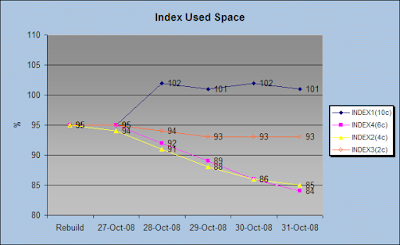
There is one line for every index we are considering, and note the legend on the graph showing the index name and the number of columns inside parenthesis.

What can be observed in this chart?
1) After rebuild (done on saturday), every index starts with 95% used space.
2) First day is sunday, the system had almost 0 activity, therefore our indexes' space usage show slight changes.
3) Starting on monday, INDEX1 reported wrong data for PCT_USED and the other indexes began their "decay" trend.
4) After a whole week of activity, indexes gained free space, some of them faster than others (for instance INDEX4 went from 95% to 84% used space, that is 11% on 5 days).

Point 3 raised a service request with Oracle.
Point 4 may be explained in terms of:
a) Table transactionality (how many insertions/deletes/updates it had)
b) Index type, if unique or non-unique.
c) Number of columns conforming the index.
d) Type of every indexed column.

I may propose the following hypothesis: the index used space decay rate is directly proportional to the table's transactionality, to the number of columns and types of them, and inversely proportional to the type of the index (Unique or non-Unique) and block size.

As you already know, B-Tree indexes have two types of nodes: called Branches and Leafs.

Now, let's see where is that space allocated, look this chart that shows increment or delta on daily samples taken from column LF_BLKS.

You may see a great saving due to rebuild, however that saving fades slowly during the following days. Next chart makes a zoom, in order to watch closely the variation rate experimented during those days.

Keep in mind the rate at which leaf blocks are incremented, later you'll see how it's related to new key insertions (transactionality).

What about the branches? ... that's what we're going to see on next chart: the behavior of those indexes for branch blocks. I've taken the sampled value for BR_BLKS and got the variation rate versus the previous day.

Please observe, the stepped peak for INDEX2 and INDEX4, during the first day of activity the number of branch blocks almost doubled, that means an intense reorganization within the index. That may be caused due to the nature of these indexes (all are UNIQUE) and a high transactionality rate.

For the INDEX3, we observe that the increase is splited between 2 days, Sunday and Monday. This table presented activity the day after the rebuild was done.

We have to ignore the INDEX4, cause their figures are not reliable.

Why is there a higher increase on the number of branch blocks? We may answer that question recalling the percentage of free space (5%) we had after the rebuild, that is a very small margin for a leaf block, and the chances of split increase if we have a UNIQUE index. We must remember that a leaf block split, may involve a branch block split.

Our partial conclusions may be stated as follow:
1) Depending on the percentage of free space, after rebuilding indexes, their state becomes "less" stable.
2) Indexes tend to take a "stable" form, with the pass of time.
3) The branch blocks are the stressed part of the B-Tree right after the rebuild.

I will finish this experiment next Saturday, and share with you all remaining findings next Tuesday; yes, seven days from now... or eight days? anyway...
I hope to get near a mathematical model for the Index Decay Rate, cross fingers.

Thank you for reading, keep in touch!

Follow to next post Index Dynamics - Part 3

Subscribe to Oracle Database Disected by Email

Follow IgnacioRuizMX on Twitter

Delicious
Bookmark this on Delicious
Custom Search